
Your institute already has classrooms, teachers, and a course students pay to attend. Now you want to sell it online too. Before the first online batch starts, someone needs to decide where those enrolments go, how fees are recorded, and which students can watch the lessons.
An LMS for training institutes should connect classroom and online learning with the course operations behind them: admissions, payments, timetables, attendance, and student access. You should be able to manage both teaching modes while keeping each course package’s rules clear.
Start with one course you already teach. Work out how you’ll offer it to classroom students, online students, and those who want both.
Throughout this article, “offline” means classes at your physical institute. The course examples are illustrative.
One institution, three ways to enrol
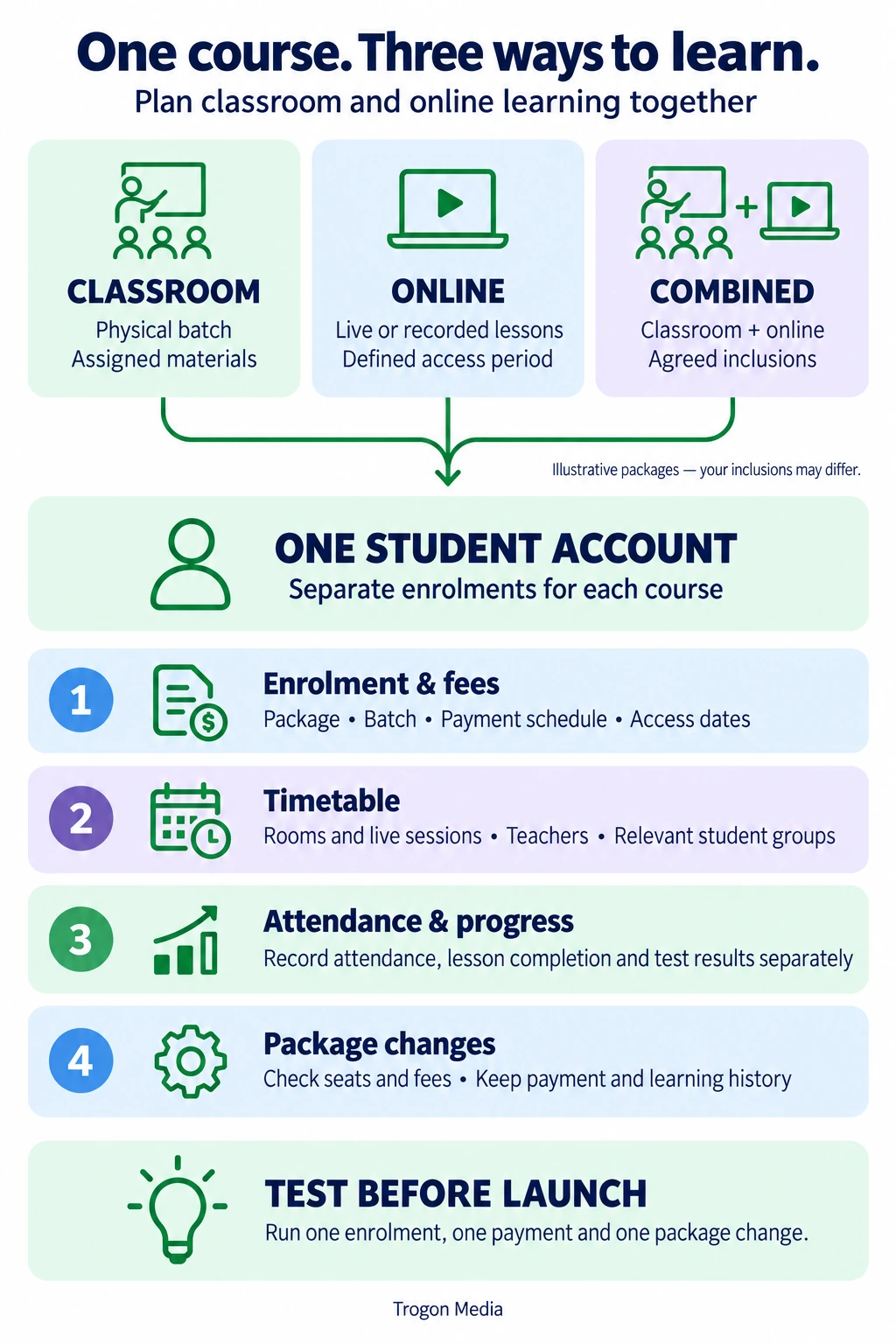
Your course is what you teach. A package defines what a student buys, including the lessons, resources, and access period covered by their fee. The batch sets their teaching group and schedule.
Keeping these separate helps you specify an LMS for institutions operating several versions of the same programme. If you also operate multiple centres, our multi-branch LMS guide explains how shared courses and branch administration fit together.
Suppose your institute offers an entrance-exam preparation course. Here’s one possible package structure:
| Package | Classroom teaching | Live online classes | Recorded lessons | Materials and tests |
|---|---|---|---|---|
| Classroom-only | Assigned physical batch | Not included | Optional add-on | Assigned course materials and tests |
| Online-only | Not included | Assigned online batch | Included until the stated expiry | Assigned course materials and tests |
| Combined | Assigned physical batch | Selected sessions | Included until the stated expiry | Assigned course materials and tests |
These are example inclusions. Your online package could contain only recordings, or your classroom fee could already include them.
The point is to make those decisions before building the checkout and student dashboard. Students should see the package contents and access period before they enrol.
A shared course library doesn’t mean identical access for every student.
Your academic team might prepare one set of lessons and questions, then assign it to several packages. The classroom batch can receive a worksheet after Tuesday’s lesson while an online batch receives it on its own schedule.
Also separate enrolment from attendance. Buying a combined package shouldn’t automatically mark a student as expected at every physical and online session covering the same lesson.
Connect admissions, course fees, and learning access
An offline institute can accept admissions at reception while its website accepts online enrolments. If enquiries begin in a CRM, plan the handover from enquiry to LMS enrolment. Ask for both routes to create the same kind of course record.
That record should show the student, course, selected package, batch, agreed fee, payment schedule, and access dates.
Keep the student’s identity separate from each enrolment. Someone studying two courses needs two sets of course details under one account. Check how your system handles siblings sharing a parent’s phone number, too.
Record payments against the right course
A student might pay an admission amount at reception and the balance online. Both payments need to appear against the same enrolment.
For a front-desk payment, specify the payment method, amount, receipt reference, and staff member recording it. If staff record a bank transfer manually, agree who verifies it before access changes.
For online payments, ask your developer how the LMS confirms success when the student closes the payment page. Specify server-side payment verification and a recovery check for missed checkout updates. Our LMS payment gateway guide covers payment integration and course access.
You don’t need to manage the integration yourself. You need to know what your staff see when payment succeeds but access hasn’t updated.
Define what payment opens
Payment and course access need an explicit connection. Your rules might allow access after an initial payment, after full payment, or following staff approval.
Set an overdue-payment and course-access policy. Decide whether access continues during a grace period and which staff member can approve an extension.
Give staff a way to review an exception and record its reason. A teacher shouldn’t have to guess whether a student can join because accounts hasn’t updated a separate list.
Manage online and offline batches with one timetable
For online and offline class management, keep the course schedule visible in one place while showing each person the sessions relevant to them.
A classroom session needs a room and a seat limit. An online session needs its meeting details. Both need a teacher, a date, a duration, and the right student group.
Ask the provider to demonstrate a timetable change using your course:
- Create a physical batch and an online batch.
- Assign teachers, rooms, session times, and online meeting details.
- Enrol students according to their packages.
- Reschedule one session and check the affected calendars.
- Confirm which students receive the update and how WhatsApp class alerts use the revised timetable.
- Check for a teacher or room booking conflict.
A combined student may attend the physical lesson and use its recording later. Decide whether an additional live online class is included, optional, or unavailable.
Running separate online batches is also a different arrangement from broadcasting a classroom lesson live. If you want the latter, plan the camera, microphone, internet connection, and someone to handle remote questions. Include a trial lesson before accepting paid enrolments for that format.
The timetable should support the teaching arrangement you’ve chosen. It can’t replace that planning.
Keep classroom attendance and online progress understandable
Attendance answers where a student participated. Learning progress records what they completed or demonstrated.
For a blended learning LMS, agree how staff should interpret each activity:
| Activity | Suggested record | Follow-up decision |
|---|---|---|
| Physical class | Teacher records attendance against the session | Whether an absent student receives catch-up work |
| Live online class | Participation matched to the enrolled student | Whether the session meets your attendance rule |
| Recorded lesson | Available viewing or completion activity | Whether a task or test is needed afterward |
| Assignment or test | Submission, attempt, feedback, and result | Whether the student needs additional help |
Check what the live-class provider actually makes available. Ask whether the integration supplies participant join and leave times or duration, how it matches those records to enrolled students, and how it applies your attendance policy. Our live-class integration guide explains the requirements to discuss.
A student might join from a parent’s account or reconnect after a dropped connection. Ask how staff review those cases.
Don’t let watching a recording silently overwrite an absence. You may want both facts: the student missed the classroom lesson and completed the catch-up work.
This distinction matters when sending parent updates, where appropriate. It also helps teachers choose what to do next. A missing attendance mark, an unfinished assignment, and a low test score call for different conversations.
Keep reports separate by batch and package when needed. If an online-only student isn’t scheduled for classroom teaching, classroom absence alerts shouldn’t apply.
Handle course-package changes without duplicate records
The difficult part of a combined setup often appears after enrolment.
Consider this illustrative example: a student buys an online-only exam-preparation package and later wants to join your weekend classroom batch.
Creating another student account would split their payment and learning history. Instead, ask your provider to demonstrate an approved package change:
| Decision | What to establish |
|---|---|
| Classroom availability | Whether the weekend batch has a seat and teaches at a suitable stage |
| Additional fee | How the upgrade amount is agreed and previous payments remain visible |
| Start date | When classroom access and the new timetable begin |
| Online access | Whether existing recordings, live sessions, and expiry dates change |
| Earlier work | How completed tests, submissions, and progress remain available |
| Approval | Which staff member can authorise the change |
A batch transfer needs care if the teaching schedules differ. The student may have finished a topic online that the weekend batch hasn’t started.
We recommend showing that mismatch to the administrator before confirming the transfer. Then the teacher can assign revision or catch-up work as needed.
Also distinguish a temporary exception from a permanent package change. Giving a classroom student access to one missed lesson doesn’t necessarily mean granting the entire recording library.
Test the reverse situation as well: a combined student moves away and wants online-only access. Your policy should define the effective date, any fee adjustment, and what happens to the classroom seat.
Before your LMS demo: Bring one course, its package inclusions, a sample fee schedule, and a timetable. Ask the provider to run an enrolment, a payment, and a package change using those details.
Choose an LMS for training institutes around your courses
An LMS for training institutes should fit the course business you intend to run. Start with the admissions and teaching decisions, then evaluate the software against them.
Use this checklist to prepare your requirements:
- Which packages will you sell, and what does each include?
- Which records should reception and online checkout share?
- Who can approve fee changes, transfers, and access extensions?
- How do physical and online batches use the same course materials?
- What can teachers see or change for their assigned students?
- Which reports help staff decide who needs follow-up?
- Who maintains the platform and supports staff after launch?
If you already have course administration software, assess what it can keep handling. For example, it may remain responsible for fees while the LMS receives confirmed enrolments and access instructions.
Specify where staff should correct a record. Requiring them to update both systems leaves room for conflicting information.
When a custom LMS makes sense
A ready-made platform may already support your packages and daily work. Compare custom, white-label and pre-built LMS options against those requirements. If it does, it can be a practical starting point, particularly when you need to launch quickly.
Custom development becomes relevant when your package rules, course workflows, or integrations repeatedly require manual workarounds.
Trogon Media builds a custom LMS around your requirements, including the agreed connections between course delivery and administration. The scope should state how your institution’s rules work in each situation described above.
Our Ecopen build includes digital attendance, online and offline fee collection, receipts, and exam scheduling. Tutor Pro demonstrates video classes, tests, assignments, and student analysis. These are reference builds; your combined workflow still needs its own requirements and acceptance checks.
Custom builds start from ₹3 lakh. Our custom LMS development cost guide breaks down build scope and recurring costs. The price increases according to requirements, and there’s no Trogon licence fee, per-student fee, or commission on student payments. A recurring infrastructure AMC still applies. Server, video, storage, and related costs depend on usage.
Ask what support, maintenance, and future changes the proposal includes. The build price alone won’t tell you who handles a problem before tomorrow’s class.
Questions about an LMS for offline and online institutions
Can an offline coaching institute use an LMS?
Yes. You can use an LMS alongside classroom teaching for course materials, assignments, tests, and progress tracking. To manage fees, timetables, and physical attendance too, specify those features or the integrations that will supply them.
Can classroom students access recorded lessons?
Yes, if their package includes it and the platform supports the required access rules. Specify the recordings and expiry date. For a student who misses a lesson, decide whether to offer temporary access to that recording alone.
Can online and offline students have different fees?
Yes, if the system supports separate packages and fee plans. Show each package’s inclusions before enrolment, and define how discounts, instalments, upgrades, and access changes should work.
Do online and offline classes need separate systems?
They can operate through one configured platform or connected systems. Evaluate whether staff can manage enrolments, fees, schedules, and progress without entering the same information twice.
Plan your first combined course
Choose the course you want to offer online first. Write down what classroom, online, and combined students will receive, then identify the records your staff currently keep separately.
Bring those details to a requirements discussion with Trogon Media. They give us a starting point for the scope and estimate.
Plan your first combined course
Discuss your offline and online LMS
Share one course, its package inclusions, a sample fee schedule and a timetable so we can discuss your scope and estimate.
Connect on WhatsApp