
An enquiry arrives on WhatsApp. A counsellor writes the name in a register, calls back on Thursday, closes the admission. Then someone opens the LMS and types that student in a second time.
That second typing is the whole question.
Short answer: if enquiries reach you through one channel and one person handles them, you don't need a CRM. A spreadsheet is honest and it's free. What changes the answer isn't how many students you have. It's how many channels the enquiries arrive through, how many people touch them, and whether you can account for the ones that went quiet.
That holds whether you're an institution with a counselling team, an EdTech company selling direct, a tutor running your own courses, or a platform already selling to both. The vocabulary changes. Leads or enquiries, signups or admissions, learners or students. The decision underneath doesn't: somebody asks about your course before they pay, and somebody becomes a learner after. Those are two different records, and something has to join them.
What a CRM Does That Your LMS Doesn't
A CRM's main job ends at admission. Your LMS's job starts there.
Before a student exists, there's an enquiry: a name, a phone number, a course they asked about, and a counsellor who called them twice. None of that is learning delivery. Your LMS has no reason to know about a parent who asked about fees in April and went silent.
After admission, the opposite. Batch allocation, attendance, test scores, and fee instalments belong with the learner record, not in a sales pipeline.
The interesting part is the seam between them. That's where the work gets duplicated, and it's where most of the real cost sits. More on it below.
You Might Not Need One Yet
Most articles on this subject are published by companies selling CRMs, which is why none of them open with this section.
If everything reaches one inbox and one person answers it, a spreadsheet does the job. That's true of a tutor selling two courses and of a single centre with one enquiry number. Adding software here creates work rather than removing it.
Three things change that answer:
- Enquiries arrive through more than one route: a form, a phone number, walk-ins, an ad campaign, or three different WhatsApp numbers.
- More than one person is calling back, and nobody can say who called whom.
- You're spending on ads and can't tell which spend produced a paying student.
Two of the three and it's worth looking. All three and you're already losing enquiries; you just can't see which ones.
Three Ways This Gets Run
| Spreadsheet / WhatsApp | Third-party CRM | CRM inside your LMS | |
|---|---|---|---|
| Cost shape | Nothing | Per user, per account, or flat monthly, forever | Part of the build, then infrastructure |
| Student record | Nobody owns it | CRM owns it until admission, then it moves | One record from enquiry to certificate |
| How far it bends | Completely, until it collapses | As far as custom fields will stretch | To your workflow |
| What breaks first | Follow-up, quietly | The join to your LMS | You're now with one vendor for both |
That last row is the honest cost of the third column. A built-in CRM means one vendor holds admissions and learning, and if that's a risk you don't want, the middle column exists for a reason.
What the third column buys, when you're building the LMS anyway: the enquiry a counsellor logged in January is still attached to that student in June, on the same record, with no export and no re-entry. Nobody charges you for adding a counsellor in March. Servers and maintenance still cost money, as they would with anything. A per-seat licence on top of them doesn't.
Compare those costs with the initial integration work using our custom LMS development cost guide, especially if admissions automation is part of a larger build.
Your LMS Decides Which of Those Three You Can Have
Before you compare CRMs, check whether your platform lets you connect one.
That table assumes three options are open to you. On a custom build they are. On a white-label or pre-built platform they usually aren't. What you get is whatever the vendor supports: one CRM they've partnered with, an API on a higher tier, or nothing. Some platforms hold the student record in a way you can't read programmatically at all, which means the join in the third column isn't a build decision; it's simply unavailable.
Ask your provider two questions before you shortlist any CRM. Can I read and write student records through an API, on my current plan? And can I export enquiry and enrolment data, in full, whenever I want? If either answer is no, the CRM question is already settled for you. We wrote about where those ceilings sit in custom LMS vs white-label vs pre-built.
What a CRM Costs, and What a Busy Season Does to That Number
The three below are general-purpose CRM candidates. Two publish rates you can compare without a sales call; LeadSquared's sales CRM is quote-based. Figures and pricing models were verified on provider-owned pages on 5 September 2026. They change often, so check again before you commit.
| Provider | Model | Published rate |
|---|---|---|
| Zoho CRM | Per user, per month | Free up to 3 users · Standard ₹800 annual / ₹1,300 monthly · Professional ₹1,400 annual / ₹2,100 monthly · Enterprise ₹2,400 annual / ₹3,000 monthly · Ultimate ₹2,600 annual / ₹3,200 monthly |
| Kylas | Flat monthly, unlimited users | Embark free · Elevate ₹12,999/month · Exceed custom |
| LeadSquared | Users and modules | Sales CRM pricing available on request |
The models matter more than the numbers, because the thing you're billed for is people, and the number of people touching enquiries rarely holds still.
Take an institution. Say you run eight counsellors most of the year and twenty-five for the two months around admissions. At Zoho Standard's published month-to-month rate of ₹1,300 a seat, that's ₹1.04 lakh for the ten quiet months and ₹65,000 for the busy two—about ₹1.69 lakh a year. Kylas at ₹12,999 flat is about ₹1.56 lakh a year whatever your headcount does, so the flat plan wins at that seasonal shape.
For a steady year-round team, the crossover changes with the billing term. Kylas becomes cheaper at about seventeen users versus Zoho Standard's annual rate, or ten users versus its month-to-month rate. On Zoho Professional, the crossover is about ten annual users or seven month-to-month users.
Illustration, not a quote—run it with your own numbers and contract terms. Zoho's lower rates require annual billing, Kylas lists quarterly, half-yearly, and annual plans for Elevate, and some education CRMs use per-application pricing, which bills you more in a year when admissions go well.
Education-specific CRMs do exist in India, and some are good. They're not in the table because public, comparable rates are hard to find. Meritto's former pricing URL returned a 404 when checked, while many providers route pricing questions to a form. If the education-specific features matter to you, collect written quotes with the same user count and admission volume before comparing them.
Where a General CRM Stops Fitting
A sales CRM models deals, pipelines, and stages. Education has batches, terms, cohorts, course bundles, fee instalments, and, in a school, a parent who is not the student but makes the decision.
You can represent all of that in Zoho. People do. It's done with custom fields, and it works until you ask a question the custom fields weren't designed to answer. Which batch is under-filled with three weeks to go? How many enquiries for the morning batch converted after the second follow-up call? A generic CRM can store the data and still struggle to report on it, because to the software those are fields, not education objects with rules.
The other limit is the admission cycle. Sales pipelines assume deals close continuously. Admissions happen in a compressed window against a term start date, and everything about staffing, targets, and reporting follows that shape.
If you're running an EdTech product rather than a centre, the same wall arrives from a different direction. Your signups are self-serve, so there's no counsellor to assign and the pipeline stages are mostly fictional. What you need instead is trial-to-paid behaviour, which course someone actually started, and where they stopped. A sales CRM can store a signup date and still tell you nothing about whether the person opened lesson two—and that, not the deal stage, may predict whether they renew.
So the real choice is a general-purpose CRM bent into an education shape, or one built in that shape to begin with.
This is where our clients tend to move. Some arrive already running a third-party CRM, keep it through the LMS build, and switch later when they scale and hit the customisation ceiling. Our custom CRM is built for EdTech rather than adapted to it: batches, courses, fee structures, and cohorts are real objects with rules, not text fields standing in for them. That's the difference the reporting question above turns on.
To be clear about what that is and isn't: we don't sell a CRM you can subscribe to next week. It's built as part of a platform, priced with it, and it makes sense when you're building or replacing one anyway. If you're not, the middle column is your answer and the section below is the case for it.
Keep the CRM You Have—When That's the Right Call
If your CRM already does the job and your counsellors know it, keep it. Retraining a team mid-cycle costs more than most integrations, and a system people actually use beats a better one they resent.
Two other cases where staying put is right:
- You need real marketing automation: campaign attribution across ad platforms, lead scoring, and drip sequences. Mature tools have spent years on this, and a custom build would reproduce it badly.
- Admissions is a separate business unit that also sells things which aren't courses.
Connecting an existing CRM to a custom LMS is ordinary work. It involves an API or webhook, a decision about which fields move and in which direction, and a shared identifier so both systems agree on who a person is. We've connected SaaS CRMs and custom-built ones. Our LMS doesn't care which you run.
Where a Lead Becomes a Student
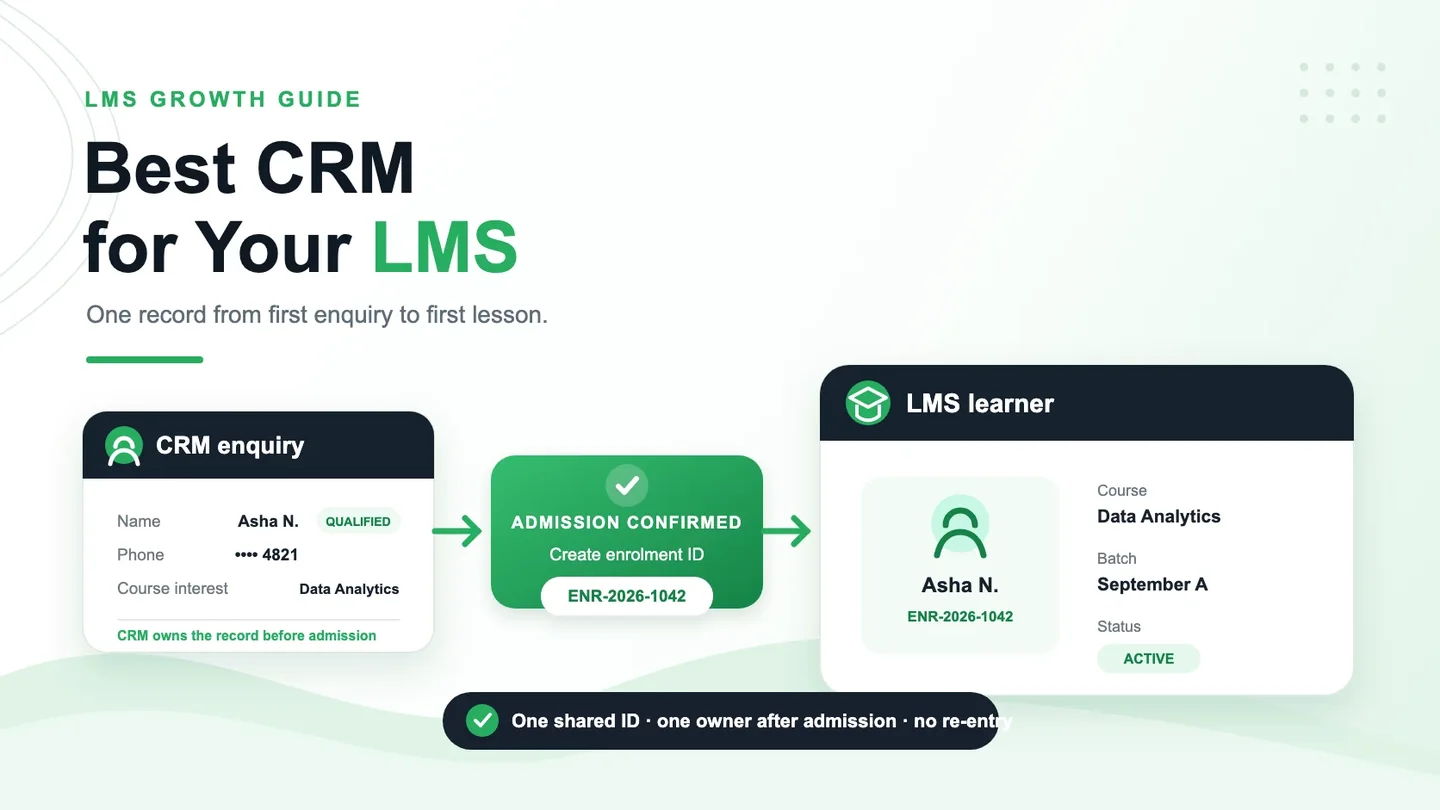
This is the part every integration guide skips, and it's where integrations actually fail.
At the moment of admission, one system has to become the owner. If both keep writing to the student record, they will disagree, and the disagreement surfaces weeks later as a student who can't log in or a fee receipt with the wrong name.
Four things to settle before anyone writes code:
- The identifier. Phone number is the obvious candidate and the wrong one—students share a parent's number, and numbers change. Generate an enrolment ID at admission and carry it in both systems.
- Direction of travel. Enquiry data flows from CRM to LMS at admission. After that, does anything flow back? Usually only status, so a counsellor can see whether the student they admitted actually started.
- Who wins an edit. A counsellor corrects a spelling three weeks after enrolment. Does that reach the LMS, or is the LMS record now authoritative and the CRM a historical log? Either is fine. Undecided is not.
- Duplicates. The same person enquires twice, six weeks apart, about two different courses. Decide whether that's one person with two enquiries or two separate records before it happens, not after.
Also decide what happens when the connection is down, because it will be at some point during admissions week. The usual answer is a queue that retries, plus a report of what didn't go through.
CRM, LMS, and ERP as One Stack
Admissions, learning, and operations are three systems that all describe the same person. Payments make a fourth, and the choice there has its own math, which we ran through in best payment gateway for your LMS.
Once you choose Razorpay, our Razorpay integration and course-access checklist helps you check that a verified payment reaches the right student and course without duplicate enrolments.
Run them as three separate products from three vendors and you spend real time reconciling them. Run them on one student record and the reconciliation disappears, along with the second typing this post opened with.
You don't have to buy all of it at once, and most shouldn't. Start with the part that's currently breaking. We build the LMS, the CRM, and school ERP, and clients add them in whatever order their problem demands. There's no per-counsellor charge on any of it—infrastructure and maintenance still cost money, as they do for anyone, but nobody bills you more for hiring another counsellor in March.
Questions We Get Asked
Do I need both a CRM and an LMS?
Only if enquiries are getting lost. The LMS is essential once you're teaching online; the CRM is optional until your enquiry channels, volume, or admissions team outgrow a simple process.
Does Zoho work with a custom LMS?
Yes. Zoho provides APIs, and connecting it to a custom LMS is routine. The work is in agreeing the field mapping, handover rules, and shared identifier, not only in opening the connection.
What does CRM and LMS integration cost?
It depends on how many fields move, the direction they move, how well the CRM API is documented, and what should happen after a failure or duplicate. Scope it as part of the build rather than as an afterthought, because retrofitting a join between two live systems adds migration and reconciliation work.
Can I move my old enquiry history across?
Usually. Exports from most CRMs are structured enough to import. What tends not to survive automatically is call recordings and anything stored as an attachment, so check those specifically before you commit to a switch.
My CRM is a spreadsheet. Is that a problem?
Not by itself. A shared sheet can support more than one editor. It becomes a problem when lead ownership, follow-up history, permissions, and reporting are no longer clear enough for the number of people and channels involved.
Who owns the data?
Ask this of any vendor before signing, and get the answer in the contract rather than on a sales call. You want your enquiry and student data exportable in a usable format, on demand, without a fee. If a provider won't put that in writing, that's the answer.
Which One Is You?
| If you are | What to do |
|---|---|
| A tutor or individual course provider | Use a spreadsheet or a free CRM tier. Revisit when someone else starts answering enquiries. |
| An institution with a counselling team | Per-seat against flat is a real decision. Run the math above against your own season before you sign anything. |
| An EdTech company selling direct | A sales pipeline won't tell you much. You need trial-to-paid behaviour, which means the CRM has to read from the LMS, not just write to it. |
| A platform already selling courses | You own the system. The question is bolt-on or built-in, and the answer depends on how far your custom fields have already stretched. |
| Building or replacing your platform now | Decide the record structure while it's still on paper. This is the cheapest this decision will ever be. |
The last three rows have a deadline attached. Retrofitting a join between two live systems means reconciling records that have already drifted apart, mid-term, while students are logging in. Built at the same time as the platform, it's a design decision. Built afterwards, it's a data migration.
Start With What's Broken
A CRM isn't a stage you graduate to. It's a fix for a specific leak, and if you can't name the leak, you'll pay every month for software that stores the same problem more neatly. Look at what's failing now: enquiries nobody called back, leads that vanished when the person handling them left, or learners typed in twice. Fix that.
Send us three things: how enquiries reach you, how many people handle them, and what you're using today. We'll tell you which row above you're in and, if a build is the answer, what it would involve for your setup. No charge for the conversation, and if the answer is “keep what you have,” that's what we'll say.
Fix the lead-to-learner handover
Find the CRM Setup That Fits Your LMS
Share your enquiry channels, admissions team size, and current tools. We will help you identify the simplest setup that closes the gaps without duplicating student data.
Connect on WhatsApp