
Consider a student who attends your batch classes but needs help applying a concept to an assignment. You arrange a private lesson. The tutor needs to see the student's earlier work, the student needs a booking slot, and your team needs to know whether that session is included in the course.
One-to-one LMS software can connect those steps. It gives individual tutoring a place alongside course materials, assignments, payments, and progress records.
You can build a platform around private teaching alone or combine it with batch classes. Start with your teaching model and enrolment rules.
What one-to-one LMS software should manage
One-to-one LMS software brings individual teaching and its administration into one system. It connects students with tutors, manages session bookings and course access, and keeps personal learning plans, assignments, feedback, and progress together. The exact workflow depends on how your tutoring business operates.
For an independent tutor, that could mean managing your own students and lesson schedule. An academy may need several tutors, staff who assign students to them, and course packages with different rules for individual support.
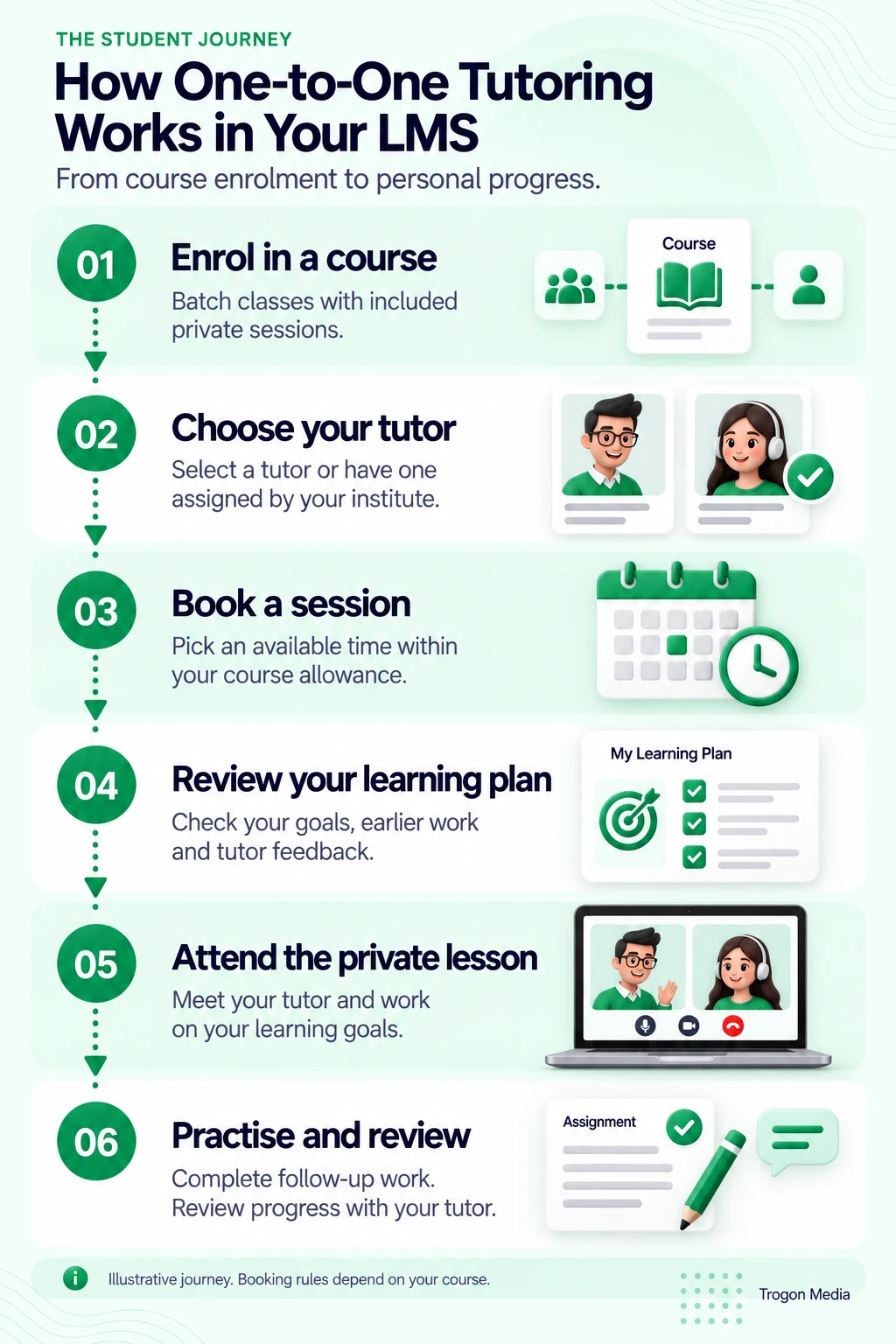
In both cases, start with the student journey:
- Enrol the student in a course with clear tutoring entitlements.
- Assign a tutor or let the student choose.
- Book an available session within the course allowance.
- Give the tutor access to relevant learning records.
- Deliver the lesson and record its outcome.
- Assign follow-up work and review it before the next session.
Specify what students and tutors should see at each step. A student might need their next lesson, remaining sessions, and unfinished assignment on the first screen. A tutor needs the student's current goal and previous feedback.
Buying a course, attending a lesson, and completing an assignment are different events. Your reports should keep those distinctions clear.
Run individual tutoring and batch classes in one LMS
Individual tutoring doesn't require every part of a course to be private. You can teach common material to a batch and use personal sessions for practice, feedback, or a student's particular goal.
Here's an illustrative arrangement, not a customer case study: a course includes weekly batch lessons and four individual sessions. Students share the syllabus and common resources. Each student's tutor manages their learning plan, while booking rules determine when they can use the private sessions included in their enrolment.
| Shared across the batch | Individual to the student |
|---|---|
| Syllabus and common learning materials | Personal learning goals and selected practice |
| Batch timetable and group lessons | Private-session bookings |
| Common assignments, where appropriate | Individual assignments and tutor feedback |
| Batch announcements | Personal progress review |
| General course access | Remaining private-session allowance |
The student should be able to move between these activities without creating another account. A private assignment should remain connected to that student even if their batch changes.
There are permission decisions to make here. Define whether the batch teacher can see private-session notes, whether a replacement tutor can access earlier feedback, and which records appear in the student's view.
If you run individual tutoring only, the same planning applies without the batch timetable. Your shared resource library can still serve several students while each follows a different learning plan.
We've developed LMS platforms combining individual tutoring with batch classes. Trogon's custom LMS development can follow the arrangement your business uses, including private sessions within a larger course.
Choose the teaching model first. Adding private sessions to every package creates a tutor-time commitment, so check that your available teaching hours can support what you sell.
Let students choose a tutor—or assign one
Tutor selection should match how you deliver the course.
Student-selected tutoring lets a learner choose from the tutors available for their subject or package. Decide what helps them choose: teaching language, subject expertise, availability, or an existing relationship.
Institution-assigned tutoring gives your team responsibility for matching the student. This can suit a course where an initial assessment or continuing relationship determines the tutor.
You can support both approaches in the same platform. For example, your team might assign a regular tutor while allowing students to book a specialist session from an approved list.
A booking should also respect the tutor's batch commitments. Test a private-session request that overlaps a group lesson, along with leave, preparation time, and recurring bookings.
For students and tutors in different countries, show the time zone clearly in confirmations and reminders. Google Calendar, for example, displays events in each participant's own time zone. Check the appointment in both systems. Google Calendar time-zone guidance
Agree what happens when the assigned tutor is unavailable. Staff may need to offer another tutor or reschedule, while keeping the student's earlier work available to the right person.
For the live lesson itself, define how students join and how attendance is recorded. Our live-class integration guide explains the connection between the LMS, meeting tools, and participation records.
Give each student a personal learning plan
A personal learning plan should help the tutor decide what to teach next. Make it specific. Start with a clear goal, relevant earlier work, and the next task.
In the course example above, one student might need to practise structuring an answer. Another may be ready for a more demanding assignment. Both attend the batch. Their private assignments can address different needs.
An individual tutoring LMS should let the tutor connect these elements:
| Record | Illustrative entry | What it helps the tutor decide |
|---|---|---|
| Current goal | Support an answer with relevant evidence | What to practise in the private lesson |
| Previous work | A submitted answer with tutor comments | Which difficulty needs attention |
| Session note | Student chose evidence but struggled to explain it | What to revisit |
| Next assignment | Rewrite the answer using the feedback | What the student should do independently |
| Review outcome | Explanation improved; conclusion needs work | Where the next session should start |
Keep session attendance separate from academic progress. A completed appointment tells you the lesson happened; the student's work helps the tutor judge what they understood.
For school-age learners, the Education Endowment Foundation's tuition guidance recommends connecting individual support with classroom teaching and monitoring progress. The review dates from July 2021. It addresses teaching practice, rather than proving that a particular LMS improves results. EEF one-to-one tuition guidance
That suggests a useful design requirement: the tutor should have the relevant batch materials and student work available before the private lesson.
Plan the review routine too. Decide who checks submissions, whether students receive written feedback, and when the learning plan is updated.
For language-test preparation, our IELTS coaching app development guide connects speaking practice, teacher feedback and one-to-one mentoring with session-based salary calculations.
The software can organise those records. Your tutors still need time to read the work and make teaching decisions.
Include private sessions in your course package
State the tutoring entitlement where students choose and purchase the course. Explain the number of included sessions, their duration, how they are booked, and when they must be used.
For the illustrative four-session package, a student's balance might look like this:
| Session status | Count |
|---|---|
| Completed | 1 |
| Booked for a future date | 1 |
| Available to book | 2 |
| Total included | 4 |
A booked session is reserved time. It has not yet been delivered. Keeping those states separate makes the balance easier to explain when a booking changes.
One-to-one LMS software should apply your agreed cancellation and rescheduling rules. Write the rules first.
| Situation | Decision to agree |
|---|---|
| Student cancels within the permitted window | Whether the reserved session becomes available again |
| Student cancels late or doesn't attend | Whether the session counts as used |
| Tutor cancels | How the student gets a replacement booking or restored credit |
| Session moves to another date | How the original reservation transfers without an extra deduction |
| Course access ends with sessions unused | Whether the student can still book, needs an extension, or loses access |
These are configurable business decisions, not a universal cancellation policy.
For exceptions, decide which staff can review the record and change a session's status after checking what happened. If an internet outage prevents a lesson, someone should be able to review what happened before deciding the session's status.
Show the resulting balance to the student. A credit return should not exist only in an administrator's notes.
Bring one course package to the requirements discussion. Write down its batch classes, included private sessions, tutor-assignment method, and cancellation rules. This is enough to start mapping the workflow.
What a custom individual tutoring LMS costs
Trogon's custom LMS builds start at ₹3 lakh, with the final price based on requirements. This is a starting build price, not a fixed quote covering every feature discussed in this article.
For an individual tutoring platform, the scope depends on decisions such as:
- A single tutor account or an academy with several staff roles.
- Student-selected booking, assigned tutors, or both.
- Individual teaching alone or combined batch and private delivery.
- Session allowances, cancellation rules, and exceptions.
- Personal learning plans, assignments, reporting, and required integrations.
Decide which workflows must be ready at launch. An academy may need combined tutor availability immediately, while a solo tutor may have a simpler scheduling arrangement.
Under Trogon's current terms, there is no licence fee, no per-student fee, and no commission on student payments. Recurring infrastructure charges remain payable through the AMC.
Those costs cover the applicable server, video hosting, storage, live-class platform, and OTP usage. They can increase as usage grows. Your chosen payment gateway may also charge its own processing fees.
Ask for the build scope and infrastructure estimate separately, and clarify support responsibilities in the proposal. Our custom LMS development cost guide explains the wider budget.
A custom build may be unnecessary if you teach a small number of students and existing software already handles your bookings and materials. It becomes worth discussing when your teaching, access, or package rules need a workflow you cannot configure adequately.
Build your individual tutoring platform with Trogon
Your platform should reflect how you teach: private lessons, batch courses with included personal support, or both.
Start with one course. For the first discussion, describe what a student should be able to do from enrolment through their first private lesson. Include tutor selection or assignment, the personal learning plan, available booking times, and how sessions are counted.
If you already use an LMS, show where that journey breaks. A tutor cannot see earlier feedback, a private booking overlaps a batch class, or staff must adjust every session balance manually.
We can use those requirements to discuss the custom build and its cost.
Plan your individual tutoring LMS
Connect with us to build your individual tutoring platform
Share one course package, your tutor-assignment method, and your booking rules. We can use those requirements to discuss the custom build and its cost.
Connect on WhatsApp