
Ask ten vendors whether your institute needs a mobile app and ten will say yes. Ask what it costs and the number roughly doubles, because Android and iOS get quoted as two separate projects.
They don't have to be two separate projects.
The LMS mobile app vs web app question has a short answer for most institutes. If you sell courses online, build both. One Flutter codebase covers Android and iOS, and the same backend already serves your web app, so you're paying for one system with three front ends instead of three systems. If your budget reaches only one thing this year, build the web app. Plan the backend and APIs for mobile from the start, and you can add the app later while reusing that foundation.
The rest of this is how to tell which of those two situations you're in.
LMS mobile app vs web app: what actually differs
An LMS web app runs in Chrome or Safari. A student opens a link, logs in, and starts studying. An LMS mobile app is installed from the Play Store or App Store and lives on the home screen.
The experience gap between them has mostly closed. Modern browsers handle video, track progress, and run live classes, provided your integrations support them. What's left is a short list of real differences, and they read better as costs on both sides than as a scorecard.
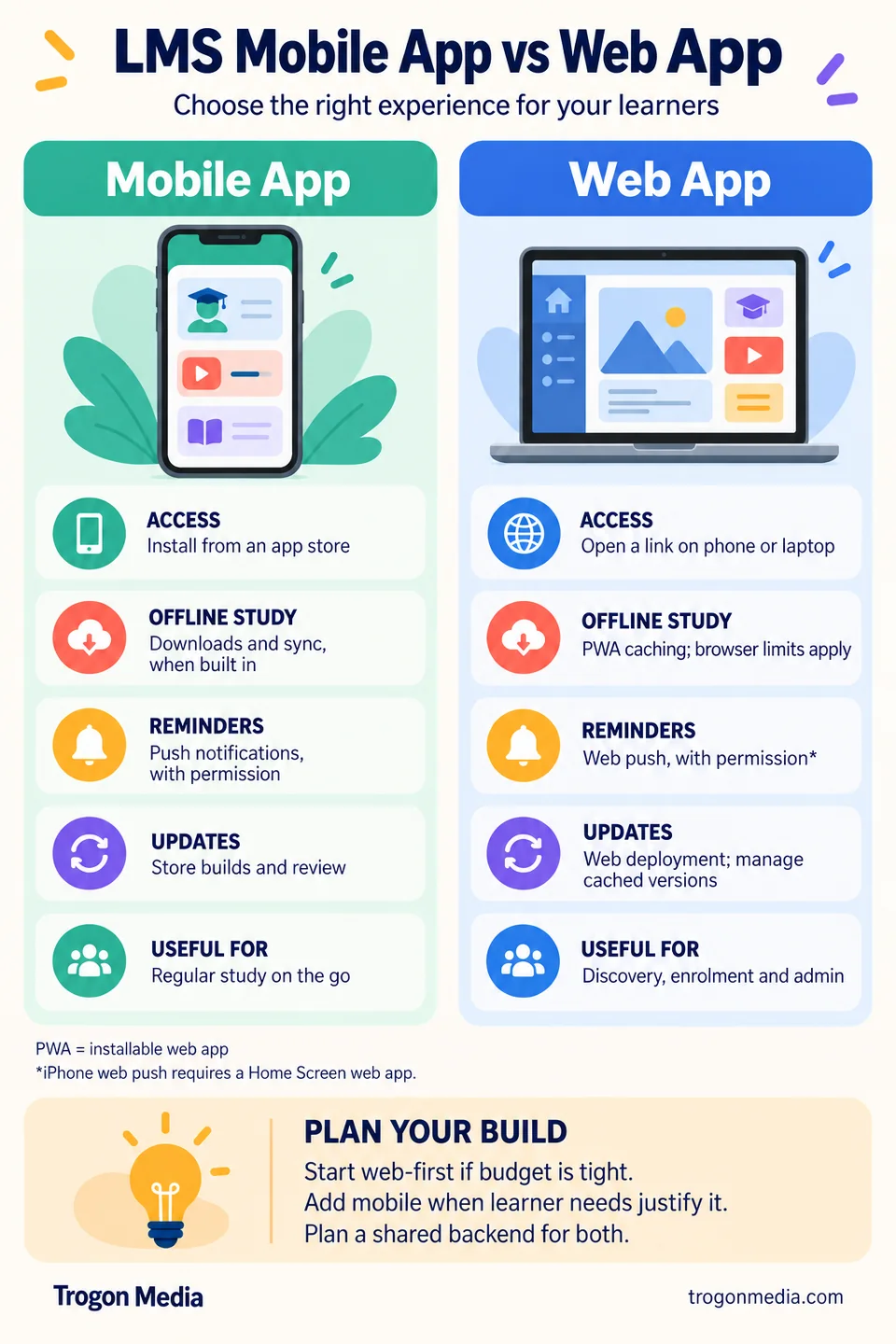
| What matters | Mobile app | Web app |
|---|---|---|
| Getting in | Install once, then one tap | Open a link; optionally add to the home screen |
| Offline study | Downloads and progress sync, when built in | Possible with offline caching; content and browser limits apply |
| Notifications | Lock-screen push, with permission | Web push, with permission; iPhone requires a Home Screen web app |
| Updates | Separate store builds and review; users receive app updates | Deploy to the web; cached versions need an update strategy |
| Shared or borrowed phone | Account switching depends on the app's design | Easy to open without installation; students still need to log out |
| Storage on the student's phone | Installed app, cached data and downloaded lessons | Browser cache, saved data and any offline content |
| How students find it | Store listing, a shared link or your home-screen icon | Search results, a shared link or a home-screen shortcut |
Two rows deserve particular attention. Notifications, because time-sensitive reminders need a channel students have enabled and actually use. And storage. Downloaded lectures take up space in either format, so test on the phones your students own.
You have four options, not two
"App or web" hides four choices, and they cost very differently.
Two native apps. One written for Android, one for iOS, usually by two teams. Direct access to each platform, two codebases to maintain, and two release cycles to keep in step. Hard to justify for an LMS.
One cross-platform app. Flutter or React Native. A single codebase compiles to both stores. This is the approach we use for our LMS mobile apps.
An installable web app. Your web app, built so a student can add it to the home screen. Often called a progressive web app, or PWA, it gets an icon and can support push notifications and offline content. Apple has supported web push on iPhone since iOS 16.4, provided the site is added to the Home Screen and the student grants permission. No app-store download or store review, although its files and saved lessons still use data and storage.
A browser-based web app. Adapts its layout to a phone, tablet or laptop. Students open it in a supported browser. Nothing to install and no app-store approval.
The third option is easy to overlook when asking for a quote. It can reuse your web app, avoids store releases, and for staff and admin logins it's often the right call. Offline support and notification setup still need to be budgeted.
Where it can fall down is student onboarding. A PWA distributed through your website doesn't have a store listing. And "tap Share, then Add to Home Screen" needs explaining to a student who hasn't decided you're worth the effort. Test that setup with your own batches before choosing it.
| Build option | Development scope | Getting it onto a phone | Offline support | Store presence |
|---|---|---|---|---|
| Two native apps | Separate Android and iOS codebases | Download from a store | Can be built for supported content | Separate Android and iOS listings |
| Cross-platform app | Shared mobile code; platform setup and testing remain | Download from a store | Can be built for supported content | Separate Android and iOS listings |
| Installable web app (PWA) | Web app plus installation, push and any offline features | Open a link, then add to home screen | Requires caching and sync; browser limits apply | Not needed for distribution through your website |
| Browser-based web app | Web interface and backend | Open a link | Usually online unless offline features are added | No store listing needed |
Why one codebase changes the maths
Flutter lets us share the interface and application logic across Android and iOS. Screens still need to adapt to different sizes, and we test on iPhones as well as budget Android handsets.
What gets shared: screens, navigation, course logic, the video player interface, the offline sync rules, the parts that make your LMS yours. What doesn't: push delivery needs platform-specific configuration, payment integrations can differ, and each store wants its own build, its own signing, and its own review queue.
The effect shows up in maintenance more than at launch. A bug in shared fee-flow code can be fixed once, then tested and released on both platforms. With two native codebases, the same change may need implementing twice. Either way, platform testing and store review still affect when students receive the fix.
We build in Flutter for that reason. One codebase for Android and iOS, on the same backend that serves your web app. You can use two native teams instead, and for a very large consumer product that sometimes makes sense. For an institute's LMS it rarely does.
Where a mobile app earns its place
Three messages an institute sends constantly:
- Fees are due on the 5th
- Your live class starts in ten minutes
- Your test result is published
These can be lock-screen notifications in a mobile app or a web app with push enabled. Students must allow notifications, and their device settings affect delivery. The difference is the setup and experience you can get them to complete, not whether browsers can send reminders at all. Firebase Cloud Messaging has no per-message charge, but your notification backend and any third-party messaging service still have running costs. If you want another channel alongside push, WhatsApp can integrate through WATI or a similar provider. That's a separate running cost, and it can be useful for fee reminders.
Offline is the second thing. A student downloads tomorrow's lectures on your Wi-Fi and watches them on a bus with no signal. Progress syncs when they reconnect. That journey has to be built and tested; installing an app doesn't make every lesson available offline. A PWA can also cache content for offline use. Compare your actual videos, quizzes, storage limits and progress sync before choosing. For students with unreliable connections, this can be the feature that decides it.
The third is duller. It matters more than it sounds. Your icon sits on the home screen between WhatsApp and Instagram, so there's no URL to remember and no link to dig out of a group chat from March. An installed PWA can give you that shortcut too; a mobile app adds the familiar store installation route.
Now the counterweight. Apps get deleted. AppsFlyer's 2025 uninstall benchmarks, using August–September 2024 data, put 30-day Android uninstall rates above 64% in Bangladesh, Nepal and Pakistan. Those figures cover apps across categories in those markets; they aren't an India-specific LMS retention forecast. Give students something useful to return to, then measure how your own app is used.
We've shipped most of this already. Ecopen, our school ERP, runs attendance with instant push, fee and due reminders, online and offline fee collection with receipts, exam scheduling, and report cards. Tutor Pro covers video and live classes, test series and practice exams, assignments and student analytics. Those are built and running, not roadmap items.
When to build the web app first
There's a version of this decision where the answer is only the web app, and we'd rather say so than sell you a phase you don't need yet.
Go web-first if your starting budget is tight, if most of your teaching still happens in a classroom, or if you don't yet know which features your students will use. A web platform gets everyone in on day one, from any phone, laptop or shared computer.
What you give up until the mobile app ships is a store listing and the app-specific experience. Push and some offline features remain possible through a PWA, if you include them in scope. A basic web app without that work will still depend on a connection for its lessons.
What you don't give up is the work. The backend, the database, the APIs, the payment flow and the admin panel are the same system whether a browser or an app is talking to it. When we plan for mobile from the start, adding it later means putting a new front end on a platform that already works. Mobile-specific features may still require backend changes, but the foundation is reusable. That's why a phased build is an option in our custom e-learning builds.
Whose app is it? Five questions to ask before you sign
Institutes skip this part, and it's the part that hurts two years later. Ask any vendor, us included:
- Which Apple and Google accounts does the app publish under, and can they be ours? We're happy either way, and most clients should want their own.
- Do we get the source code? If the answer is vague, that's the answer.
- What happens to the listing and its reviews if we leave? Store ratings take years to build.
- Is this built from a template? Under Apple's guideline 4.2.6, apps made through commercial template services generally need to be submitted directly by the content provider. Know who that is before you plan a launch date.
- Is it more than a wrapper around the website? Apple's guideline 4.2 expects useful features, content and an interface that go beyond repackaging a website. A web view behind an icon isn't a guaranteed shortcut through review. Read both requirements in the App Review Guidelines.
There's a sixth question where we come off worse, so ask it too. How fast can you be live? If you need students logging in this week, a subscription platform may be the better fit. Our standard build takes about 30 days; allow for store review when planning public availability.
A decision rule for your institute
| Your situation | Build |
|---|---|
| Selling courses online to people who aren't your students yet | Web and app together when budget allows. Use the web for discovery and the app for regular study |
| Coaching institute with running batches | App on a shared web platform, if regular study and reminders justify it; consider a PWA for a smaller first phase |
| School or college | Web for staff, admin and the fee desk. App for students and parents |
| A few courses, small numbers, no plan to scale yet | Web only, or a subscription platform |
That last row is advice, not modesty. If you're selling four courses to two hundred people, a monthly subscription can cost less to start than a custom build, and the honest comparison lives in our piece on custom, white label and pre-built LMS platforms.
What it costs and how long it takes
Our standard LMS starts at ₹3 lakh and covers all three: Android, iOS and web. Courses, video, live classes, tests, payments, student panel, admin panel. Our standard delivery timeline is 30 days, from requirement analysis through UI/UX and build to handover. Store review can affect the public launch date.
Custom business flows change both numbers. If your fee structure has scholarship slabs, or your batches need a rule no platform expresses, that's scope on top of the standard set. It adds days as well as rupees, and we'd rather quote it up front than find it in week three.
There's no licence fee, no per-student fee, and no commission on the payments your students make. You do pay an annual maintenance charge, and it's infrastructure passed through at cost: servers, video hosting, object storage, the live-class platform. Those bills rise as your usage rises. Video hosting isn't free for anyone. What doesn't rise is a fee that charges you more for having enrolled more students. For the wider budgeting context, read why custom LMS development costs more and our guide to video hosting costs for online courses.
For a complete budget beyond web and mobile delivery, read our custom LMS development cost in India guide, covering the initial build, AMC, integrations and hidden costs.
Start with what you send
Most institutes asking about an LMS mobile app vs a web app are really asking which one to skip. If money is the constraint, skip the mobile app for now and build a web platform with a backend ready to serve mobile later. If budget and student demand support both, planning them together can avoid duplicated work.
Before anyone quotes you, work out what you actually send your students in a normal week. If time-sensitive reminders and downloaded lessons matter every week, compare a mobile app with a PWA using those exact journeys. If students mainly open an occasional link, a web app may be enough. Message volume alone doesn't settle the choice.
Talk through your requirements, or message us on WhatsApp at +91 96051 31100. We'll go through your batches, your fee flow and the integrations you need, and tell you which of the four options fits. It's a conversation, not a demo, and it costs nothing.
Keep planning your LMS
One learning platform, the right front ends
Choose What Your Institute Should Build
Bring your batches, fee flow and student learning needs. We will help you scope a web app, mobile apps, or a phased build.
Connect on WhatsApp